Your business in one workspace, with AI agents you can trust.
Mail, tickets, knowledge, invoicing, shipping and your store, self-hosted. Agents work under your team's permissions, and sensitive actions wait for your approval.
- Source-available (FSL)
- Self-hosted
- Bring your own model key
One workspace
Instead of a helpdesk, a wiki, an invoicing app and a pile of automations.
Your team and your agents work in the same place, on the same records. Each app keeps its colour, everywhere in Liaison.
Mail
Shared and personal mailboxes, Gmail included
Mail: forwardTickets
Support inboxes, SLAs, internal notes
Tickets: replyKnowledge
Docs your agents answer from, with citations
Knowledge: update documentInvoicing
Invoices, quotes, proformas, credit notes
Invoicing: issue invoiceShipping
Carrier quotes, labels and tracking with Boxtal
Shipping: create shipmentStore
Shopify orders, customers, returns, discounts
Shopify: create discountAccounting
Pennylane: P&L, trial balance, cash
Finance: upload supplier invoiceAnd any app you add
Projects, calendar and more built in. Write your own with the app SDK; MCP works both ways.
The pills are actions an agent can ask for. By default each one waits for a person to approve it.
Agents you can trust
Agents get your permissions, not more.
An agent uses the same tools and the same access rules as the person it works for. The database decides what it can see, and you decide what it can send.
- Permissions in the database
- Postgres row-level security decides what a person or an agent can read, not the agent's judgement. The app's own connection can't bypass it.
- Approvals for sensitive actions
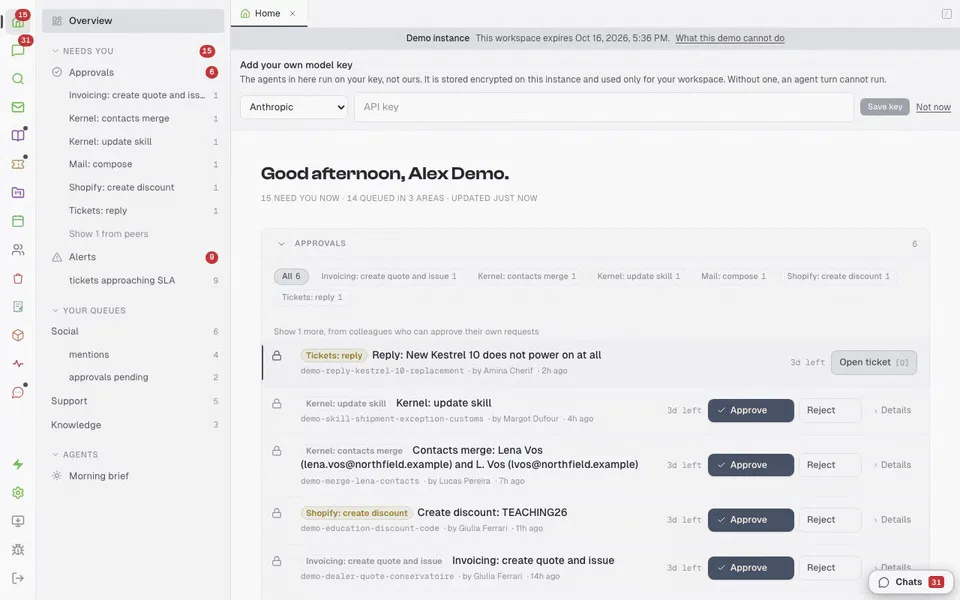
- Sensitive actions, such as customer replies, invoices, discounts and merges, wait in an approvals tray. A person can edit the request, then approve or reject it.
- Your model key
- Bring your own key from Anthropic, OpenAI or Google. You pick the model, and you pay the provider directly.
- Your data on your server
- Everything lives in your own Postgres and object store. What leaves is what an agent sends to your model provider and what you choose to connect.

Live demo
Run a company for an afternoon.
The demo gives you your own copy of Resonant Audio Labs, a fictional maker of portable field recorders. Its tickets, knowledge, invoices and approvals are already there, and you are its CEO.
- Enter a name and an email to get your own workspace.
- Add your own model key. It is stored encrypted and used only for your workspace.
- Ask an agent to draft a reply, then approve it from the card.
Your copy lasts 72 hours. Fictional data only.
In production
Two companies run on it every day, and have cancelled about €7,500 a year of software.
Unlike the demo company, these two are real.
Run your own
Your own instance in about 9 minutes, best case.
Liaison runs with Docker Compose on your machine or your server: one image, Postgres, Redis, MeiliSearch and an S3-compatible object store.
Set it up with Claude Code or Codex
Your coding agent follows the setup playbook in the repository. It asks a few questions, starts the stack, loads your company's knowledge from your website and repositories, and sets up a support agent that answers from it.
$ git clone https://github.com/mathieufro/liaison.git
$ cd liaison
$ claude "set up Liaison for my company"
# or: codex "set up Liaison for my company"One command
Needs Docker, Docker Compose v2 and openssl. The script writes fresh secrets, starts the stack and prints the URL to sign in.
$ git clone https://github.com/mathieufro/liaison.git
$ cd liaison
$ ./deploy/quickstart.sh
About a minute when the image is cached; a few minutes on the first run. The first registration creates your org and signs you in.
About 9 minutes is the best case, measured on a Mac mini with a small website and no mailbox. Each account that needs a browser consent (Gmail, Shopify) adds 5 to 15 minutes. The README has the full time table. You run it afterwards: upgrades, backups and uptime are yours, and the production runbook covers them.
Licence, data and trust
Is Liaison open source?
It is source-available under the Functional Source License 1.1 with the Apache 2.0 future licence (FSL-1.1-ALv2). You can read, modify and self-host it, including for your own internal commercial use. You may not offer it, or a substantially similar product, as a competing commercial product or service. Each release becomes available under the Apache License 2.0 two years after that release. Full terms in the LICENSE.
Where does my data go?
It stays on the machine or server you run Liaison on: Postgres for records, an S3-compatible store for files, MeiliSearch for search. Nothing is sent to us. Your model provider sees what an agent sends in a model call, which is already limited to what the person it works for may see.
What does it cost?
Self-hosting is free under the licence above. You pay your model provider directly for what your agents use.
Can someone trick an agent with a crafted email?
They can try, and no model is immune. That's why an agent only has the permissions of the person it works for, and why replies, invoices and other sensitive actions wait for a person to approve them. A fooled agent can propose something wrong, but someone sees it before it goes out. Use a frontier model for agents that read outside input, keep approvals on for anything that leaves your company, and read Using AI agents safely.
How do I report a security issue?
Privately, please: use GitHub's private vulnerability reporting on the repository's Security tab, or email contact@liaison.sh. Don't open a public issue.
Want it set up for you? We deploy and support Liaison for companies, and agencies are welcome. Setup and support
See it run a real (fictional) company.
Your own copy of Resonant Audio Labs, with its tickets, knowledge and approvals. Bring your model key.